Businesses often use the terms CRM and ERP together, but they solve different problems.
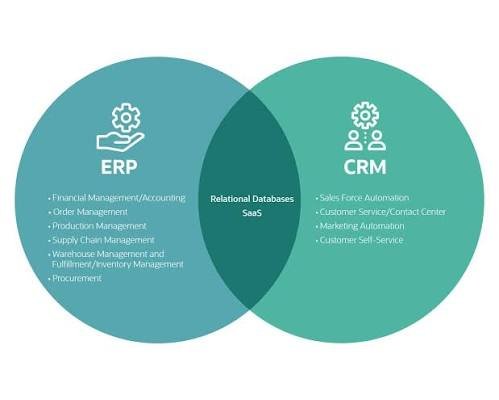
A CRM primarily focuses on customer relationships, sales, marketing and service.
An ERP focuses more broadly on internal business operations such as finance, procurement, inventory, supply chain and other operational processes.
Modern platforms can combine or connect CRM and ERP capabilities. Microsoft, for example, describes Dynamics 365 as a collection of CRM and ERP applications that can be used individually or together.
Understanding the difference is important because buying an ERP when you only need a CRM can introduce unnecessary complexity, while relying on a CRM alone may not provide the operational capabilities a growing business requires.
What Is CRM?
CRM stands for Customer Relationship Management.
CRM software is designed to help businesses manage interactions with current and potential customers.
Common CRM functions include:
- Contact management
- Lead management
- Sales automation
- Marketing
- Customer service
- Sales pipelines
- Reporting
- Customer communication
Microsoft describes CRM as a central platform for managing customer data and interactions across sales, marketing and service.
Example
Imagine a software company receives 100 enquiries.
Its CRM can help answer:
- Who are the prospects?
- Which salesperson owns each lead?
- What stage is each opportunity at?
- When was the customer last contacted?
- Which leads are most likely to convert?
- What revenue is currently in the pipeline?
What Is ERP?
ERP stands for Enterprise Resource Planning.
ERP software focuses on managing and connecting core business operations.
Depending on the platform, ERP can include:
- Finance
- Accounting
- Procurement
- Inventory
- Supply chain
- Manufacturing
- Human resources
- Project management
- Operations
Microsoft describes ERP applications as connecting areas such as finance, inventory, HR and supply-chain operations.
Example
A manufacturing company may use ERP software to answer:
- How much inventory do we have?
- What raw materials need ordering?
- Which purchase orders are outstanding?
- What invoices are due?
- What did production cost?
- What is the financial position of the business?
CRM vs ERP: Simple Explanation
The easiest way to remember the difference is:
CRM = customers and revenue generation
ERP = internal operations and resource management
There is some overlap, but the primary focus is different.
| Area | CRM | ERP |
|---|---|---|
| Customer management | Strong | Limited/connected |
| Leads | Strong | Usually limited |
| Sales pipeline | Strong | Limited |
| Marketing | Strong | Limited |
| Customer service | Strong | Limited/possible |
| Accounting | Limited | Strong |
| Inventory | Limited | Strong |
| Procurement | Limited | Strong |
| Manufacturing | Limited | Strong |
| Supply chain | Limited | Strong |
| HR | Usually limited | Often available |
| Finance | Limited | Strong |
CRM Features
A CRM generally includes tools for managing customer-facing activities.
Contact Management
Stores customer and prospect information.
Lead Management
Tracks potential customers.
Sales Pipeline
Shows opportunities at different stages.
Marketing Automation
Helps automate campaigns and customer communication.
Customer Service
Tracks support requests and interactions.
Analytics
Provides information about sales and customer activity.
Modern CRM platforms increasingly use AI and automation to support sales, service and customer insights.
ERP Features
ERP software typically handles internal operations.
Accounting
Manages:
- Accounts payable
- Accounts receivable
- General ledger
- Financial reporting
Inventory
Tracks:
- Stock
- Warehouses
- Product movements
- Reordering
Procurement
Manages:
- Suppliers
- Purchase orders
- Purchasing workflows
Manufacturing
Depending on the system:
- Production planning
- Bills of materials
- Work orders
- Quality processes
Supply Chain
Connects purchasing, inventory, production and distribution.
CRM Example
Consider a marketing agency.
A potential client fills out a website form.
The CRM can:
- Capture the lead
- Assign a salesperson
- Schedule follow-up
- Record calls
- Track the proposal
- Track negotiations
- Mark the opportunity as won
That’s primarily a CRM workflow.
ERP Example
Now imagine the same company needs to manage:
- Employee costs
- Supplier invoices
- Expenses
- Accounting
- Procurement
- Financial reporting
Those activities are more closely associated with ERP functionality.
Does a Small Business Need ERP?
Not necessarily.
A small business may only need a CRM if its biggest challenge is managing:
- Leads
- Customers
- Sales
- Follow-ups
For example, a small consulting company with three employees might not need a comprehensive ERP.
A CRM plus accounting software could potentially be enough.
When Does a Business Need ERP?
ERP becomes more relevant when internal operations become complex.
Examples include:
- Manufacturing
- Multiple warehouses
- Large inventory
- Complex procurement
- Multi-location operations
- Detailed financial controls
- Supply-chain management
- Large-scale operations
The decision should be based on business complexity rather than company size alone.
Can a Business Use Both CRM and ERP?
Yes.
Many businesses use both systems.
For example:
CRM
→ Customer enquiry
→ Sales opportunity
→ Quote
→ Order
ERP
→ Inventory check
→ Purchase order
→ Fulfilment
→ Invoice
→ Accounting
Connecting these systems can reduce duplicate data entry.
Why CRM and ERP Integration Matters
Suppose a salesperson promises a customer that a product is available.
If the CRM isn’t connected to inventory information, the salesperson may not know whether the product is actually in stock.
With an integrated CRM and ERP environment, customer-facing teams can potentially access relevant operational information.
Microsoft describes connected CRM and ERP applications as a way to connect teams, processes and data.
CRM vs ERP for Manufacturing
Manufacturers often benefit from both.
CRM can manage:
- Customers
- Leads
- Sales
- Quotations
- Customer relationships
ERP can manage:
- Raw materials
- Production
- Inventory
- Purchasing
- Costing
- Finance
- Supply chain
For a manufacturing company, CRM and ERP can therefore represent two connected sides of the business.
CRM vs ERP for E-Commerce
An e-commerce business may also use both.
CRM can manage:
- Customer profiles
- Marketing
- Segmentation
- Customer support
- Repeat purchases
ERP can manage:
- Inventory
- Procurement
- Warehousing
- Finance
- Fulfilment
The exact software architecture depends on the business model and existing technology.
CRM vs ERP for Service Businesses
A service company may initially need CRM more than ERP.
For example:
- Consultants
- Marketing agencies
- Real estate agents
- Insurance brokers
- Professional services
The CRM can manage leads, customers, sales and communication.
As the company grows, it may add ERP or financial/operational software for more complex internal processes.
CRM vs ERP Cost
There isn’t one standard price for either system.
Costs depend on:
- Number of users
- Features
- Modules
- Implementation
- Integrations
- Data migration
- Customisation
- Training
- Support
ERP projects can involve significant implementation work because they may affect many departments and core business processes.
CRM deployments can also become complex, especially when integrating sales, marketing, customer service and external systems.
CRM vs ERP Implementation
CRM implementation often focuses on:
- Customer data
- Sales stages
- Workflows
- Lead sources
- Communication
- Reporting
ERP implementation can involve:
- Finance
- Inventory
- Procurement
- Manufacturing
- Warehouses
- Supply chain
- HR
- Business processes
Therefore, ERP implementation can affect a broader part of the organisation.
CRM vs ERP Data
CRM data generally revolves around customers.
Examples:
- Contact details
- Lead history
- Sales opportunities
- Calls
- Emails
- Support history
ERP data is more operational.
Examples:
- Inventory
- Supplier information
- Purchase orders
- Invoices
- Financial transactions
- Production data
Integration allows relevant information to move between the two environments.
Should You Buy CRM or ERP First?
Ask one simple question:
What is currently causing the biggest operational problem?
If the problem is:
“We’re losing sales leads and forgetting customer follow-ups.”
A CRM may be the more relevant starting point.
If the problem is:
“We can’t accurately manage inventory, purchasing and financial operations.”
ERP may be more relevant.
If the business has both problems, an integrated approach may make sense.
CRM vs ERP Decision Checklist
Choose CRM-focused software when you primarily need:
- Lead management
- Customer management
- Sales pipeline
- Marketing automation
- Customer service
- Sales reporting
Consider ERP when you primarily need:
- Accounting
- Inventory
- Procurement
- Manufacturing
- Supply chain
- Financial management
- Operational planning
Consider both when:
- Sales and operations are becoming complex
- Multiple departments need shared data
- Inventory needs to connect with sales
- Customer orders need to flow into operations
- Finance needs integrated business data
CRM and ERP Comparison
| Question | CRM | ERP |
|---|---|---|
| Who are our customers? | ✓ | |
| Which leads are active? | ✓ | |
| What deals are likely to close? | ✓ | |
| What marketing campaigns work? | ✓ | |
| What inventory do we have? | ✓ | |
| What do we owe suppliers? | ✓ | |
| What did production cost? | ✓ | |
| What invoices are outstanding? | ✓ | |
| How much stock should we order? | ✓ | |
| How can customer and operational data connect? | ✓ | ✓ |
Can One Platform Do Both?
Yes.
Some modern business platforms provide both CRM and ERP applications.
Microsoft Dynamics 365 is one example: Microsoft offers CRM applications for sales, customer insights and customer service alongside ERP applications covering finance, supply chain and other operational functions.
However, having both capabilities available doesn’t mean every company needs to deploy every module.
Businesses should select the applications that solve their actual requirements.
Final Thoughts
CRM and ERP aren’t necessarily competing technologies.
They solve different categories of business problems.
CRM focuses primarily on customers, sales, marketing and service.
ERP focuses primarily on finance, inventory, procurement, manufacturing, supply chain and other internal operations.
For a small service business, CRM may be enough initially.
For a manufacturer or distributor, ERP may become essential as operations grow.
For larger or more complex businesses, integrating CRM and ERP can connect customer-facing activities with internal operations.
The most useful approach is to identify your business processes first and then select the software architecture that supports them.
This article is for general informational purposes. Software capabilities vary by provider, edition and configuration, so verify current features, pricing and integration options before purchasing.