Choosing the right server for your website or application can be confusing.
You may come across terms such as cloud server, VPS, virtual private server, dedicated server, bare metal server, and cloud hosting when comparing hosting providers.
Although these services can look similar, they are designed for different workloads, budgets, and technical requirements.
A small business website may need only a basic VPS. A growing application may benefit from cloud infrastructure, while a resource-intensive enterprise application may require dedicated physical hardware.
So, what should you choose?
The answer depends on your performance requirements, scalability, budget, technical skills, traffic, security requirements, and workload.
In this guide, we’ll compare cloud servers, VPS hosting, and dedicated servers in detail.
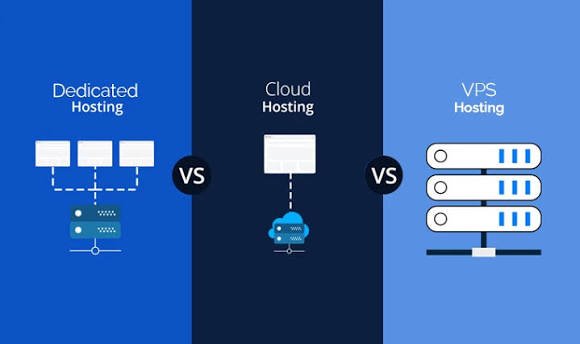
Cloud Server vs VPS vs Dedicated Server: Quick Comparison
| Feature | Cloud Server | VPS | Dedicated Server |
|---|---|---|---|
| Physical hardware | Cloud provider’s infrastructure | Usually one physical host | Entire physical server |
| Virtualization | Usually yes | Yes | Optional |
| Resource flexibility | High | Moderate to high | High, but hardware-bound |
| Scalability | High | Moderate | More limited |
| Physical isolation | Usually no, unless dedicated option | No | Yes |
| Performance | Depends on cloud configuration | Consistent allocated resources | Maximum physical resources |
| Cost | Flexible | Usually affordable | Usually highest |
| Management | Provider handles hardware | Provider handles hardware | Provider handles hardware |
| Technical skill | Low to high | Moderate | Moderate to high |
| Best for | Growing apps and variable workloads | Websites and applications | High-resource workloads |
| Traffic spikes | Good with suitable architecture | Limited by allocated resources | Limited by physical capacity |
| Customization | High | High | Very high |
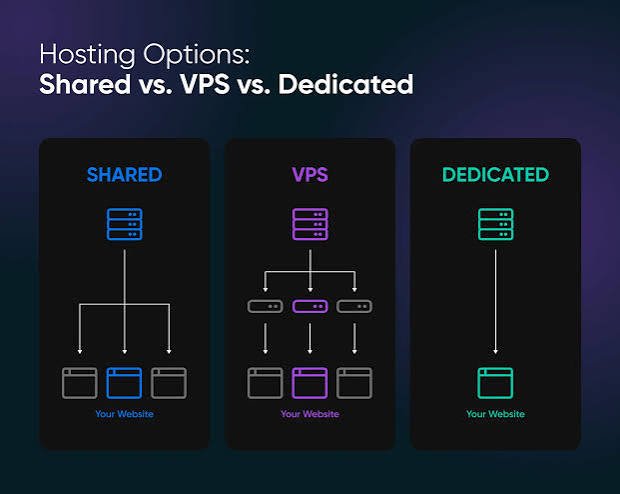
A cloud server is generally a virtualized server running on a cloud provider’s infrastructure. A VPS is a virtualized environment with an allocated portion of a physical host’s resources. A dedicated server gives one customer access to the entire physical machine.
What Is a Cloud Server?
A cloud server is a virtual server created on a cloud provider’s infrastructure.
Instead of purchasing a physical server, you provision a virtual machine with resources such as:
- vCPUs
- RAM
- Storage
- Networking
- Operating system
- Security settings
The cloud provider manages the underlying physical infrastructure.
Cloud servers can generally be created, resized, duplicated, stopped, or deleted through a management console or API.
This makes them useful for applications where infrastructure requirements can change over time.
AWS describes cloud servers as virtualized servers running on cloud-provider infrastructure, with resources that can be provisioned and scaled without managing the underlying physical hardware yourself.
How Does a Cloud Server Work?
A simplified architecture looks like this:
Your Website / Application
↓
Cloud Server
↓
Virtualization Layer
↓
Cloud Infrastructure
↓
Physical Servers + Storage + Networking
The physical hardware is owned and maintained by the cloud provider.
You interact with the virtual server rather than the physical machine.
This abstraction is one of the main reasons cloud infrastructure can be provisioned quickly.
What Is a VPS?
VPS stands for Virtual Private Server.
A VPS is created by dividing a physical server into multiple virtual environments.
Each VPS receives an allocated amount of resources such as:
- CPU
- RAM
- Storage
The virtual environments are isolated from one another.
AWS explains that VPS environments use virtualization to partition physical infrastructure into separate virtual machines with allocated resources.
For example, one physical server might run several VPS environments:
Physical Server
→ VPS 1
→ VPS 2
→ VPS 3
→ VPS 4
Each customer manages their own virtual environment while the hosting provider manages the underlying physical hardware.
Is a VPS the Same as a Cloud Server?
This is where hosting terminology becomes confusing.
Not necessarily.
A VPS can run on traditional physical infrastructure, while a VPS can also be provided as part of a cloud platform.
In other words:
VPS describes the virtualization environment.
Cloud server describes the infrastructure and delivery model.
Some providers use terms such as:
- Cloud VPS
- Cloud server
- Virtual server
- Cloud instance
for products that have overlapping characteristics.
Therefore, when comparing hosting providers, don’t rely only on the product name.
Look at:
- Underlying infrastructure
- Resource allocation
- Availability
- Scaling
- Storage
- Network
- Backup system
- Data center architecture
DigitalOcean notes that traditional VPS hosting can involve a single physical server, while cloud hosting can use interconnected infrastructure and more flexible resource models.
What Is a Dedicated Server?
A dedicated server is an entire physical server assigned exclusively to one customer.
Instead of sharing the physical machine with other customers, you receive access to the server’s complete hardware resources.
A dedicated server can include:
- Physical CPU
- RAM
- SSD/NVMe storage
- Network interfaces
- Hardware-level configuration
- Full operating system control
AWS describes dedicated hosting as exclusive access to the entire physical server, providing greater control over the underlying hardware.
How Does a Dedicated Server Work?
Imagine a physical server with:
32 CPU cores
128 GB RAM
4 TB NVMe storage
With a dedicated server, that entire machine is allocated to your organization.
You don’t need to divide the hardware with other customers.
This can be useful for applications that require:
- High CPU performance
- Large amounts of RAM
- High storage performance
- Consistent resources
- Physical isolation
- Specialized configurations
Cloud Server vs VPS vs Dedicated Server: Performance
Performance depends on the actual hardware and configuration, not just the hosting category.
Cloud Server Performance
Cloud servers can provide strong performance and flexible resource allocation.
They are particularly useful when workloads change.
For example:
Normal traffic → moderate resources
Traffic spike → additional resources
Cloud infrastructure can also support architectures using multiple servers, load balancing, caching, and other services.
VPS Performance
A VPS provides allocated resources within a virtualized environment.
This can offer predictable performance for many websites and applications.
However, the underlying physical server places limits on how far the VPS can scale.
Dedicated Server Performance
A dedicated server provides access to the complete physical machine.
For workloads that can use many CPU cores, large amounts of RAM, or high-performance local storage, dedicated hardware can provide substantial capacity.
AWS notes that dedicated servers provide greater hardware resources and control, while VPS hosting can offer a balance between performance and cost.
Which Is Faster: Cloud Server, VPS or Dedicated Server?
There is no universal answer.
A high-performance cloud instance can outperform a weak dedicated server.
A powerful dedicated server can outperform a small cloud instance.
A well-configured VPS can outperform a poorly configured cloud server.
The actual performance depends on:
- CPU generation
- CPU frequency
- Number of cores
- RAM
- Storage type
- Storage IOPS
- Network performance
- Software configuration
- Database performance
- Caching
- Application architecture
Therefore, don’t choose a hosting type based solely on the word “cloud” or “dedicated.”
Cloud Server vs VPS: What’s the Difference?
The biggest difference is usually the underlying infrastructure and scalability model.
VPS
A VPS generally gives you a virtual machine with allocated resources.
It can be an excellent option when your workload is relatively predictable.
Cloud Server
A cloud server is typically provisioned on cloud infrastructure designed to make computing resources easier to deploy and scale.
Cloud platforms can also provide additional services such as:
- Load balancers
- Managed databases
- Object storage
- Multiple regions
- Auto scaling
- Cloud networking
AWS notes that cloud hosting can provide more flexible architecture options than traditional VPS hosting, although cloud VPS products can combine both models.
VPS vs Dedicated Server: What’s the Difference?
The main difference is how much physical hardware you receive.
VPS
You receive a virtualized portion of a physical server.
Dedicated Server
You receive the entire physical server.
AWS describes a VPS as a partitioned portion of physical resources and dedicated hosting as exclusive access to the entire physical server.
Cloud Server vs Dedicated Server
Cloud servers and dedicated servers can both be powerful, but they approach infrastructure differently.
Cloud Server
You rent virtualized resources from a cloud provider.
Advantages can include:
- Flexible scaling
- Fast provisioning
- Multiple regions
- API-based management
- Additional cloud services
- Pay-as-you-go options
Dedicated Server
You rent an entire physical machine.
Advantages can include:
- Full physical resources
- Hardware-level control
- Physical isolation
- Consistent hardware performance
- Specialized configurations
Dedicated hardware can be useful for workloads where physical isolation or maximum access to a particular machine matters.
Scalability Comparison
Scalability is one of the biggest differences between these options.
Cloud Server
Cloud infrastructure can make scaling easier.
You may be able to:
- Increase CPU
- Increase RAM
- Add additional servers
- Use load balancing
- Deploy to another region
- Automatically scale applications
VPS
A VPS can also be upgraded.
For example:
2 GB RAM → 4 GB → 8 GB → 16 GB
But the maximum available resources may depend on the physical host and provider.
Dedicated Server
Scaling a dedicated server usually means moving to a larger physical machine or adding additional servers.
This can take more planning than changing the size of a virtual cloud instance.
AWS notes that scaling a VPS can generally be easier than physically adding resources to a dedicated server.
Which Is Better for Traffic Spikes?
For websites with unpredictable traffic, cloud infrastructure can provide more flexibility.
Imagine an ecommerce website that normally receives:
10,000 visitors per day
During a sale:
100,000 visitors per day
A cloud architecture can potentially add resources or additional application instances to handle the increased workload.
However, simply buying a cloud server does not automatically create auto-scaling.
The application and infrastructure need to be designed for scaling.
A VPS with fixed resources and a dedicated server can also handle significant traffic, but their scaling process may require more manual intervention.
Cost Comparison
Cost varies enormously depending on provider and configuration.
Generally:
VPS
Lower to moderate cost
Good for websites and applications with predictable resource requirements.
Cloud Server
Flexible cost
You can start small and add resources or services as required.
Dedicated Server
Higher cost
You pay for an entire physical machine, even if the server is not fully utilized.
AWS notes that VPS hosting can be more cost-effective than dedicated hardware when the full capacity of a physical server is unnecessary.
Which Is More Cost-Effective?
This depends on utilization.
Suppose you need:
4 CPU cores + 8 GB RAM
Buying a dedicated server with:
32 CPU cores + 128 GB RAM
may leave a significant amount of hardware unused.
A VPS or cloud server could therefore be more practical.
But suppose your application consistently requires:
24–32 CPU cores + 128 GB RAM
A dedicated server may become more economically attractive depending on provider pricing and workload.
The important calculation is:
Required resources vs total monthly infrastructure cost
—not simply the advertised hosting price.
Security Comparison
All three can be configured securely.
However, their isolation models differ.
Cloud Server
Cloud providers offer security features such as:
- Firewalls
- Identity and access controls
- Network security
- Encryption
- Monitoring
- DDoS protection options
VPS
VPS environments are isolated virtual machines.
However, multiple VPS instances can reside on the same physical host.
Dedicated Server
The physical server is dedicated to one customer.
This can be useful when physical isolation is important.
Some regulated or sensitive workloads may have specific infrastructure or compliance requirements.
However, dedicated hardware does not automatically make an application secure.
Application security, access control, patching, encryption, backups, and monitoring still matter.
Which Is Easier to Manage?
This depends on whether you choose managed or unmanaged hosting.
Managed Cloud
The provider may handle more infrastructure tasks.
Ease: High
Managed VPS
The provider can handle server administration.
Ease: High
Unmanaged VPS
You manage most server configuration yourself.
Ease: Moderate
Dedicated Server
You generally have more responsibility for the operating system and server environment.
Ease: Moderate to Low
If you’re a beginner, managed hosting can be much easier than managing a server entirely yourself.
Cloud Server vs VPS vs Dedicated Server for WordPress
WordPress can run on all three.
Small WordPress website
A VPS may be more than enough.
Growing WordPress website
A cloud server can provide additional flexibility.
Large WooCommerce website
Cloud infrastructure or dedicated hardware may be appropriate depending on traffic and database requirements.
Enterprise WordPress
A more complex architecture may use:
- Multiple application servers
- Dedicated database
- CDN
- Object storage
- Load balancer
- Caching
The hosting type should be selected based on actual resource requirements rather than WordPress itself.
Cloud Server vs VPS vs Dedicated Server for Ecommerce
Ecommerce websites often need:
- Fast database queries
- Reliable storage
- Secure payment integrations
- Backups
- High availability
- Traffic handling
- Monitoring
A small ecommerce store may work well on a VPS.
A growing store may use cloud infrastructure.
A very large ecommerce platform may use multiple cloud servers or dedicated infrastructure.
Cloud Server vs VPS vs Dedicated Server for Developers
Developers often value:
- Root access
- APIs
- Flexible operating systems
- Docker/container support
- Git deployment
- Custom software
- Databases
- Networking
Cloud servers can be particularly useful because infrastructure can be provisioned programmatically.
VPS servers are also popular for development and testing because they provide relatively inexpensive isolated environments.
Dedicated servers can be useful for resource-intensive development workloads.
When Should You Choose a VPS?
A VPS may make sense if:
- Your website has moderate traffic
- You need root access
- You want predictable resources
- You need custom server software
- Your workload is relatively stable
- You want to control costs
- You have some technical knowledge
A VPS can be a practical middle ground between shared hosting and dedicated hardware.
AWS specifically identifies VPS hosting as suitable for small and medium businesses, business applications, websites, and development environments.
When Should You Choose a Cloud Server?
Consider a cloud server if:
- Your traffic changes significantly
- You expect rapid growth
- You need flexible infrastructure
- You want multiple regions
- You need cloud APIs
- You need additional cloud services
- You want easier infrastructure scaling
Cloud infrastructure can be especially useful for applications that need to change as demand changes.
When Should You Choose a Dedicated Server?
A dedicated server may be appropriate if:
- You need substantial CPU resources
- You require large amounts of RAM
- You need high-performance local storage
- You need physical isolation
- Your workload consistently uses significant resources
- You require specialized hardware
- You have specific compliance requirements
Dedicated servers can provide complete access to the physical machine, but they usually cost more and can require more infrastructure planning.
Cloud Server vs VPS vs Dedicated Server: Decision Guide
Choose a VPS if:
You want a balance of price, control, and predictable resources.
Typical users:
- Bloggers
- Small businesses
- Agencies
- Developers
- Medium-sized websites
Choose a Cloud Server if:
You want flexible infrastructure and easier scaling.
Typical users:
- SaaS companies
- Growing websites
- Ecommerce businesses
- APIs
- Applications with variable traffic
- Technology startups
Choose a Dedicated Server if:
You need substantial physical resources or physical isolation.
Typical users:
- Large applications
- High-resource databases
- Enterprise workloads
- Specialized applications
- Certain compliance-sensitive workloads
Cloud Server vs VPS vs Dedicated Server: Pros and Cons
| Option | Main Advantages | Main Limitations |
|---|---|---|
| Cloud Server | Flexible, scalable, fast deployment | Can become complex and expensive |
| VPS | Affordable, controlled, predictable | Limited by underlying infrastructure |
| Dedicated Server | Maximum physical resources and isolation | Higher cost and less flexible scaling |
What About Bare Metal Servers?
Bare metal is closely related to dedicated servers.
A bare metal server provides direct access to physical hardware without the typical virtualization layer.
This can be useful for workloads that need:
- Maximum hardware performance
- Low virtualization overhead
- Specialized hardware
- Physical isolation
Cloud providers can also offer bare metal services.
Therefore, “cloud” and “dedicated” are not always mutually exclusive.
A cloud provider can offer dedicated physical servers as part of its cloud platform. AWS, for example, offers dedicated hosts and dedicated instances within its cloud ecosystem.
What About Managed VPS and Managed Cloud?
If you don’t want to manage Linux, updates, security, backups, and server configuration yourself, look for a managed service.
A managed hosting provider may handle:
- Server setup
- Updates
- Monitoring
- Backups
- Security configuration
- Troubleshooting
- Migration
This usually costs more than unmanaged infrastructure, but it can save considerable time for business owners.
Common Mistakes When Choosing a Server
Buying Too Much Hardware
A small website rarely needs an expensive dedicated server.
Choosing Only Based on Price
The cheapest server may not include backups, support, or the resources you actually need.
Ignoring Backups
A server is not a backup.
Keep independent copies of important data.
Ignoring Server Location
Choose infrastructure appropriate for your customers and compliance requirements.
Assuming Cloud Means Unlimited
Cloud infrastructure can scale, but resources still have limits and scaling needs to be configured.
Ignoring Management Requirements
A cheap unmanaged VPS isn’t necessarily cheap if you need to pay someone to maintain it.
Frequently Asked Questions
Is a cloud server better than a VPS?
Neither is universally better. A cloud server may provide more flexible infrastructure and scaling, while a VPS can provide predictable resources at a lower cost for many workloads.
Is VPS faster than cloud hosting?
Not necessarily. Performance depends on the CPU, RAM, storage, network, virtualization platform, workload, and configuration.
Is a dedicated server faster than a VPS?
A dedicated server provides access to the entire physical machine, so it can provide substantially more total resources than a smaller VPS. But actual performance depends on the hardware and workload.
Is a cloud server more expensive than a VPS?
It can be, but not always. Pricing depends on resources, provider, region, storage, bandwidth, backups, and additional services.
Is VPS good for small businesses?
Yes. A VPS can be suitable for small and medium businesses that need more control and resources than basic shared hosting provides.
Is a dedicated server worth it?
It can make sense when a business consistently needs substantial resources, physical isolation, or specialized hardware. For smaller workloads, a VPS or cloud server may provide sufficient resources without paying for an entire physical machine.
Can a VPS become a cloud server?
A VPS can run on cloud infrastructure. The terminology depends on the provider’s architecture and product design.
Can I move from VPS to cloud hosting later?
Yes. Websites and applications can generally be migrated to cloud infrastructure as their requirements change.
Does cloud hosting improve SEO?
Cloud hosting itself does not guarantee better Google rankings. Hosting can influence technical factors such as performance and availability, but SEO depends on many factors.
Final Thoughts
Cloud servers, VPS hosting, and dedicated servers all solve different infrastructure problems.
A VPS can be a practical choice when you want predictable resources, server control, and relatively low cost.
A cloud server can be useful when you need flexible infrastructure, easier scaling, and access to a wider cloud ecosystem.
A dedicated server can make sense when you need substantial physical resources, specialized hardware, or physical isolation.
The best choice depends on your actual workload.
Before purchasing, evaluate:
- CPU requirements
- RAM requirements
- Storage
- Traffic
- Database size
- Scalability
- Security
- Backups
- Server location
- Technical expertise
- Monthly budget
Don’t choose a server simply because it has the word “cloud” or “dedicated” in its name.
Choose the infrastructure that provides the resources, control, scalability, and management level your website or application actually requires.