Cloud computing has changed the way people use technology. Instead of buying expensive physical servers and managing everything locally, businesses and individuals can access computing resources over the internet.
Today, cloud computing powers websites, mobile applications, online storage, streaming platforms, business software, artificial intelligence, and many other digital services.
But what exactly is cloud computing, how does it work, and why do businesses use it?
In this beginner-friendly guide, you will learn what cloud computing means, how cloud services work, the different types of cloud computing, the benefits and disadvantages, common examples, pricing, security, and how to choose the right cloud service.
What Is Cloud Computing?
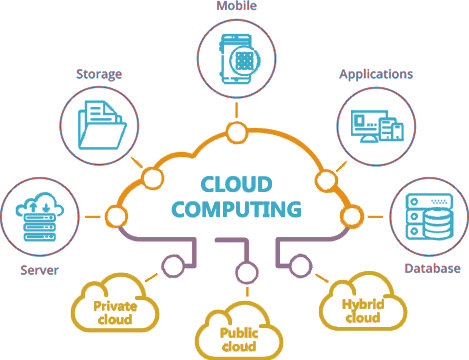
Cloud computing is the delivery of computing resources over the internet.
Instead of owning and maintaining all the hardware needed to run applications or store data, users can access resources from cloud providers.
These resources can include:
- Computing power
- Storage
- Databases
- Networking
- Software
- Virtual machines
- Security services
- Artificial intelligence tools
- Backup systems
- Analytics platforms
For example, when you store files using an online storage service, you don’t need to own the physical servers where those files are stored.
The cloud provider manages the underlying infrastructure while you access your data through the internet.
Simple Example
Traditional computing:
Your computer → Local storage → Local software
Cloud computing:
Your device → Internet → Cloud infrastructure → Application/data
This makes cloud services accessible from many different devices and locations.
How Does Cloud Computing Work?
Cloud computing relies on large data centers containing servers, storage systems, networking equipment, and other infrastructure.
Cloud providers operate these data centers and make computing resources available to customers through the internet.
When you use a cloud service, the provider typically handles much of the underlying infrastructure.
For example, if a company launches an application using cloud infrastructure, it may rent virtual servers instead of purchasing physical servers.
The company can then increase or decrease resources according to its requirements.
A simplified cloud architecture includes:
Users
↓
Internet
↓
Cloud Provider
↓
Servers + Storage + Networking + Databases
↓
Applications and Services
The actual architecture can be much more sophisticated, particularly for large businesses and applications.
Why Is Cloud Computing So Popular?
Cloud computing became popular because it changed the economics and flexibility of computing infrastructure.
In the traditional model, a company may need to:
- Purchase servers
- Build server rooms
- Install networking equipment
- Maintain hardware
- Replace failed components
- Pay for electricity and cooling
- Hire people to manage infrastructure
With cloud computing, businesses can rent infrastructure and services from a cloud provider.
This can reduce the amount of physical infrastructure they need to purchase themselves.
Cloud computing also allows organizations to experiment and launch applications without making large upfront hardware investments.
What Are the Main Types of Cloud Computing?
Cloud computing is generally divided into several service models.
The three most commonly discussed are:
- Infrastructure as a Service (IaaS)
- Platform as a Service (PaaS)
- Software as a Service (SaaS)
Let’s understand each one.
What Is Infrastructure as a Service (IaaS)?
Infrastructure as a Service, commonly called IaaS, provides fundamental computing infrastructure over the internet.
This can include:
- Virtual machines
- Storage
- Networking
- Firewalls
- Computing resources
Instead of purchasing a physical server, you can rent virtual infrastructure.
Example
Imagine you want to launch a web application.
With traditional infrastructure, you might purchase a physical server.
With IaaS, you can create a virtual server in a cloud environment and pay for the resources you use.
IaaS is commonly used by:
- Developers
- Startups
- IT teams
- Businesses
- Web applications
- Enterprise software
What Is Platform as a Service (PaaS)?
Platform as a Service provides developers with an environment for building and deploying applications.
The cloud provider manages more of the infrastructure, allowing developers to focus primarily on application development.
PaaS can provide:
- Runtime environments
- Development tools
- Databases
- Application hosting
- Deployment systems
- Scaling capabilities
This can reduce the amount of server administration developers need to perform.
PaaS is particularly useful when development teams want to build and deploy applications without managing every component of the underlying infrastructure.
What Is Software as a Service (SaaS)?
Software as a Service, or SaaS, delivers software through the internet.
Instead of installing and maintaining software locally, users access the application online.
Examples of SaaS use cases include:
- Online office applications
- Customer relationship management
- Accounting software
- Project management
- Design applications
- Communication platforms
The provider generally manages the application, infrastructure, updates, and maintenance.
For many consumers, SaaS is the most visible form of cloud computing.
IaaS vs PaaS vs SaaS
| Feature | IaaS | PaaS | SaaS |
|---|---|---|---|
| Infrastructure management | Customer manages more | Provider manages more | Provider manages most |
| Technical knowledge | Higher | Moderate | Low |
| Main users | IT teams/developers | Developers | End users/businesses |
| Flexibility | Very high | High | Lower |
| Examples | Virtual servers | App platforms | Online software |
| Maintenance | More responsibility | Shared | Mostly provider |
The basic idea is simple:
IaaS = Rent infrastructure
PaaS = Build applications on a managed platform
SaaS = Use software through the internet
What Are the Different Types of Cloud Deployment?
Cloud environments can also be categorized by how infrastructure is deployed.
The main models are:
- Public cloud
- Private cloud
- Hybrid cloud
- Multi-cloud
Public Cloud
A public cloud is infrastructure provided by a cloud provider and shared across multiple customers.
Customers typically use isolated resources within the provider’s infrastructure.
Public cloud is popular because it offers flexibility and can reduce the need for businesses to maintain their own physical infrastructure.
Private Cloud
A private cloud environment is dedicated to a specific organization.
It may provide greater control over infrastructure and configuration.
Private cloud environments are often considered for organizations with specific security, compliance, or infrastructure requirements.
Hybrid Cloud
Hybrid cloud combines private infrastructure with public cloud resources.
For example, a company might keep certain systems on its own infrastructure while using public cloud resources for additional computing capacity.
Multi-Cloud
Multi-cloud means using services from more than one cloud provider.
An organization might use one provider for computing, another for a specialized database service, and another for a particular application or geographic requirement.
What Are the Benefits of Cloud Computing?
Cloud computing provides several important advantages.
1. Lower Upfront Hardware Costs
Businesses don’t necessarily need to purchase large amounts of physical infrastructure before launching a project.
Instead, they can access resources through cloud services.
This can be particularly useful for startups and small businesses.
2. Scalability
Cloud resources can often be increased or decreased according to demand.
For example, an ecommerce website may need more resources during a major shopping event than during a normal day.
Cloud infrastructure can provide more flexibility for these changing requirements.
3. Accessibility
Cloud applications can often be accessed from different locations and devices, provided the user has the appropriate internet connection and credentials.
This supports remote work and distributed teams.
4. Faster Deployment
Cloud platforms can allow companies to create servers, databases, applications, and other resources much faster than purchasing and installing physical infrastructure.
5. Flexible Resource Usage
Businesses can select resources according to their needs instead of purchasing a fixed physical server.
6. Backup and Disaster Recovery
Cloud services can be used for backup and disaster recovery.
Organizations can store copies of important information in separate systems or locations.
7. Global Infrastructure
Many cloud providers operate data centers across multiple geographic regions.
This can help businesses deploy applications closer to their users.
What Are the Disadvantages of Cloud Computing?
Cloud computing also has limitations.
1. Internet Dependency
Many cloud services require an internet connection.
If connectivity is poor or unavailable, access to cloud applications may be affected.
2. Ongoing Costs
Cloud services usually involve recurring costs.
A business needs to monitor usage to avoid unnecessary expenses.
3. Security Responsibilities
Using a cloud provider does not eliminate security responsibilities.
Organizations still need to manage:
- Passwords
- Access permissions
- User accounts
- Encryption settings
- Application security
- Data policies
4. Vendor Lock-In
Moving an application from one cloud provider to another can sometimes be complicated.
Applications that rely heavily on provider-specific services may require significant changes during migration.
5. Technical Complexity
Advanced cloud environments can become complex.
Large deployments may involve:
- Virtual networks
- Containers
- Databases
- Load balancers
- Identity systems
- Monitoring
- Security policies
Is Cloud Computing Secure?
Cloud computing can be secure, but security depends on the provider, architecture, configuration, and how the customer uses the service.
Cloud providers typically invest heavily in infrastructure security, but customers still have responsibilities.
A secure cloud environment may include:
- Multi-factor authentication
- Encryption
- Firewalls
- Access controls
- Security monitoring
- Regular backups
- Network segmentation
- Identity management
- Software updates
One important concept is the shared responsibility model.
In many cloud environments, the provider is responsible for securing the underlying infrastructure, while the customer is responsible for securing aspects of their applications, accounts, data, and configurations.
The exact responsibilities vary by service.
Cloud Computing vs Traditional Computing
Traditional computing usually involves owning or directly controlling physical infrastructure.
Cloud computing allows users to access infrastructure and services through a provider.
| Feature | Traditional Computing | Cloud Computing |
|---|---|---|
| Hardware | Usually owned | Usually rented/managed |
| Upfront cost | Can be high | Often lower |
| Scalability | Limited by installed hardware | More flexible |
| Maintenance | Customer responsibility | Shared/provider-managed |
| Deployment | Can take longer | Often faster |
| Remote access | Depends on setup | Common |
| Resource flexibility | Lower | Higher |
Neither approach is automatically right for every organization.
Some companies continue to use physical infrastructure because of regulatory, performance, operational, or architectural requirements.
What Is Cloud Storage?
Cloud storage is one of the simplest examples of cloud computing.
Instead of storing all your files only on your computer or external drive, cloud storage allows data to be stored on remote infrastructure and accessed over the internet.
Common uses include:
- Photos
- Documents
- Videos
- Business files
- Backups
- Shared folders
Cloud storage can also provide synchronization between multiple devices.
For example, a document saved on one device may become available on another device through the cloud service.
What Is Cloud Hosting?
Cloud hosting is a type of hosting infrastructure that uses cloud resources to run websites or applications.
Traditional hosting may rely heavily on a particular server environment, while cloud hosting can use distributed infrastructure.
Cloud hosting can be useful for:
- High-traffic websites
- Ecommerce stores
- Web applications
- SaaS platforms
- Growing businesses
- Websites with changing traffic
However, cloud hosting does not automatically make every website faster.
Website performance also depends on:
- Server configuration
- Database performance
- Caching
- CDN
- Website code
- Images
- Traffic
- Available resources
Cloud Computing for Small Businesses
Cloud computing is not only for large technology companies.
Small businesses can use cloud services for:
- File storage
- Accounting
- Website hosting
- Customer management
- Online meetings
- Marketing
- Backup
- Collaboration
- Business applications
One advantage is that a small business can access software and infrastructure without building a large internal IT environment.
For many businesses, SaaS applications are an easy starting point because they require less technical management.
Cloud Computing for Developers
Developers use cloud platforms for many different tasks.
They can create:
- Virtual machines
- Databases
- APIs
- Development environments
- Application servers
- Containers
- AI applications
- Data-processing systems
Cloud platforms also make it easier to create temporary development environments.
A developer can create infrastructure for testing and remove it when it is no longer needed.
Cloud Computing and Artificial Intelligence
Modern AI applications rely heavily on computing infrastructure.
Training and running large AI models can require substantial:
- CPU resources
- GPU resources
- Memory
- Storage
- Networking
Cloud computing makes these resources available without requiring every organization to purchase and maintain its own large GPU infrastructure.
Businesses can therefore experiment with AI services and machine learning workloads using cloud infrastructure.
How Much Does Cloud Computing Cost?
There is no single cloud computing price.
Costs depend on the service and resources being used.
Common billing factors include:
- CPU usage
- Memory
- Storage
- Data transfer
- Database usage
- GPU usage
- Number of users
- API requests
- Operating time
Some cloud services charge based on usage, while others offer fixed monthly plans or subscriptions.
Before selecting a cloud provider, compare:
- Monthly cost
- Data transfer charges
- Storage pricing
- Backup costs
- Database costs
- Support plans
- Regional pricing
- Minimum commitments
- Additional service charges
A low hourly price does not necessarily mean the lowest total monthly bill.
How to Choose a Cloud Provider
If you’re considering cloud services, look at more than just price.
Consider these factors:
1. Location
Choose regions that make sense for your users and business requirements.
2. Pricing
Calculate your expected monthly usage instead of looking only at advertised starting prices.
3. Performance
Consider CPU, memory, storage, networking, and application requirements.
4. Security
Review authentication, encryption, monitoring, compliance, and access-control options.
5. Reliability
Check the provider’s published availability commitments and infrastructure information.
6. Support
Consider what level of technical support is included.
7. Scalability
Check whether resources can be increased as your application grows.
8. Services
If you need databases, AI, storage, networking, analytics, or other services, compare the provider’s ecosystem.
Common Examples of Cloud Computing
You may already use cloud computing every day without realizing it.
Examples include:
Online email services store messages on remote infrastructure.
Cloud Storage
Files can be synchronized across multiple devices.
Streaming
Video and music services rely on large distributed infrastructure.
Online Documents
Users can create and edit documents through web applications.
Online Backup
Data can be backed up to remote servers.
Business Software
CRM, accounting, project management, and communication platforms can operate as cloud services.
Website Hosting
Websites can run on cloud infrastructure rather than only on a single physical server.
Is Cloud Computing the Same as the Internet?
No.
The internet is the global network that connects computers and devices.
Cloud computing is a method of delivering computing resources and services through networks such as the internet.
A simple way to remember it is:
Internet = connectivity
Cloud computing = computing resources and services delivered through that connectivity
Is Cloud Computing Worth It?
For many businesses and applications, cloud computing can provide valuable flexibility.
But moving everything to the cloud isn’t automatically the right decision.
The best approach is to evaluate:
- Business requirements
- Security requirements
- Performance
- Budget
- Scalability
- Technical skills
- Compliance
- Existing infrastructure
A small website may need only basic hosting.
A growing ecommerce platform may benefit from scalable cloud infrastructure.
A large enterprise may use a combination of cloud and physical infrastructure.
Frequently Asked Questions About Cloud Computing
What is cloud computing in simple words?
Cloud computing means using computing resources such as storage, servers, databases, and software through a network instead of relying entirely on locally owned hardware.
What is an example of cloud computing?
Online storage, web-based email, SaaS applications, cloud hosting, streaming platforms, and cloud-based databases are common examples.
Is cloud computing expensive?
Cloud computing costs vary widely. Some services are inexpensive, while advanced infrastructure can become expensive depending on resource usage.
Is cloud computing safe?
Cloud services can provide strong security, but security depends on the provider, configuration, access controls, application security, and customer practices.
What are the 3 main types of cloud computing?
The three common service models are IaaS, PaaS, and SaaS.
What is the difference between cloud and hosting?
Cloud computing is a broad technology model that includes computing, storage, databases, software, and other services. Cloud hosting specifically refers to hosting websites or applications using cloud infrastructure.
Can beginners use cloud computing?
Yes. Many cloud services are designed for non-technical users, while advanced cloud platforms provide tools for developers and IT professionals.
Is cloud computing good for small businesses?
It can be. Small businesses can use cloud services for email, storage, accounting, collaboration, websites, backups, and other business applications without maintaining extensive physical infrastructure.
Final Thoughts
Cloud computing has transformed the way individuals and businesses access technology.
Instead of purchasing and maintaining all computing infrastructure themselves, organizations can access servers, storage, databases, software, and other resources through cloud services.
The biggest advantages include flexibility, scalability, accessibility, and faster deployment.
However, cloud computing also introduces considerations such as recurring costs, security responsibilities, technical complexity, and potential vendor lock-in.
For beginners, the easiest way to understand cloud computing is to remember:
You don’t necessarily have to own the computer infrastructure you use. You can access computing resources as a service.
As your website, business, or application grows, cloud computing can provide additional options for scaling technology around your actual requirements.